Dynamic
Navigation: Configuration > Network > IP routing > Dynamic
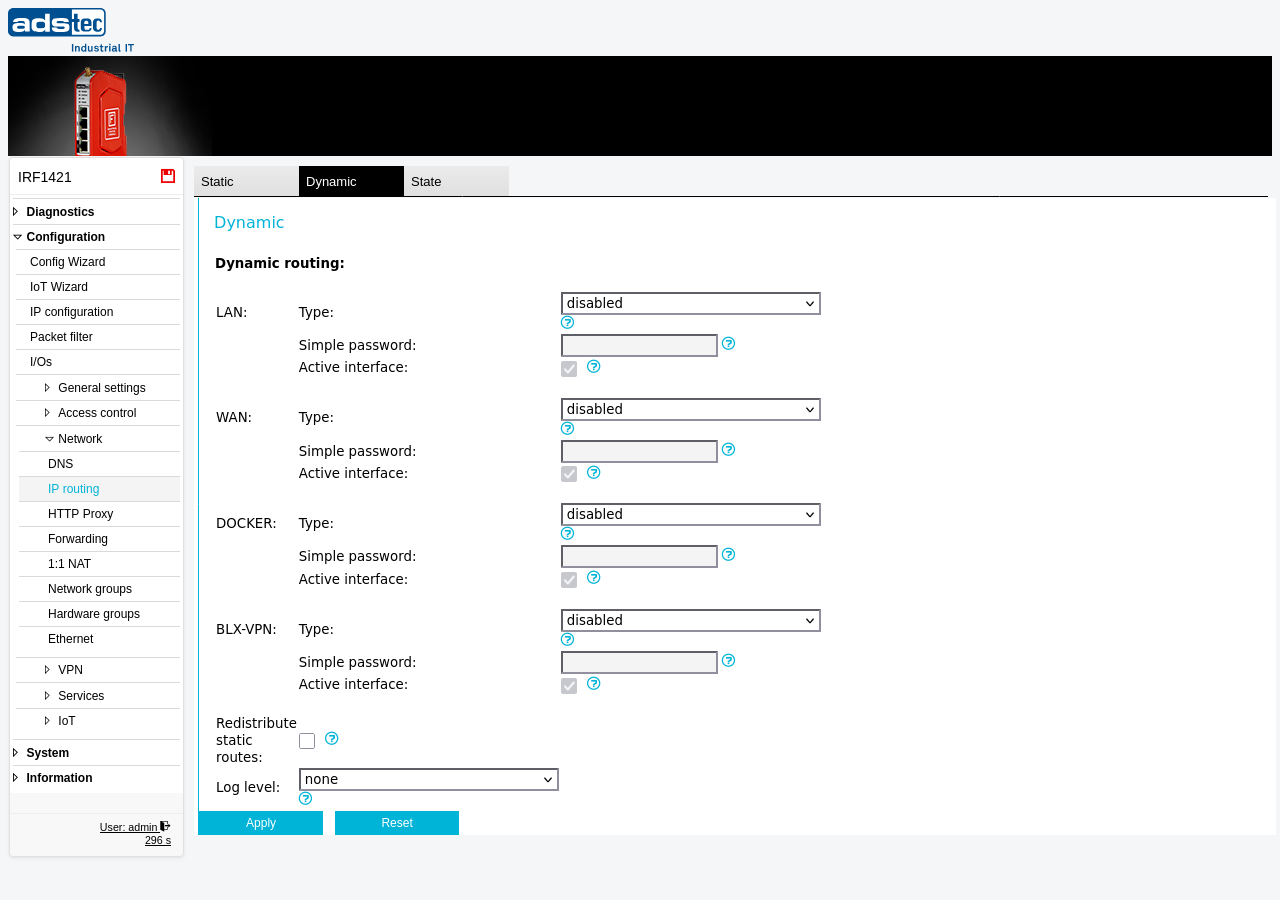
The Dynamic tab configures dynamic routing protocols on the device's network interfaces. Dynamic routing allows the device to automatically exchange routing information with neighboring routers using RIP (Routing Information Protocol) or OSPF (Open Shortest Path First), eliminating the need to manually define every route. Each interface -- LAN, WAN, DOCKER, and BLX-VPN -- can be configured independently with its own protocol selection, authentication, and participation settings. For static route configuration, refer to the parent page IP routing. Dynamically learned routes can be inspected on the State tab. Changes take effect after clicking Apply settings, but must be saved persistently via the Save page to survive a reboot.
Prerequisites
- The device must be operating in IP router mode. Dynamic routing is not applicable in transparent bridge mode. Configure the operational mode on the IP configuration page.
- Neighboring routers on the respective interfaces must support the selected routing protocol (RIP, OSPF, or both).
Settings
The page is organized by network interface. Each interface section (LAN, WAN, DOCKER, BLX-VPN) offers the same three settings described below.
Per-interface settings
- Type
-
Selects the dynamic routing protocol for this interface. Available options:
- disabled -- No dynamic routing protocol is active on this interface.
- RIP -- The Routing Information Protocol is a widely used distance-vector protocol that helps routers dynamically adapt to network changes.
- OSPF -- Open Shortest Path First is a more modern link-state protocol that has largely superseded RIP.
- Both -- Enables both RIP and OSPF simultaneously on this interface.
- Simple password
- An optional authentication password for OSPF/RIP. When set, all routing protocol packets on this interface are protected with this password. Note that this password is transmitted in clear text. It is only intended to prevent misconfigured routers from participating in the routing domain.
- Active interface
-
Controls whether the interface actively participates in routing advertisements.
- RIP: When enabled, the device sends route advertisements on this interface. When disabled, the interface only listens for incoming advertisements and its connected networks are still included in advertisements sent on other active interfaces.
- OSPF: When enabled, OSPF is fully active on this interface. When disabled, the interface's connected networks are included in advertisements on other active interfaces, but unlike RIP, the interface does not listen for incoming OSPF advertisements either.
Global settings
- Redistribute static routes
- When enabled, all static routes defined on the IP routing Static tab are redistributed via OSPF and RIP to neighboring routers. Note that the metric values from the static routing table are not used during redistribution.
- Log level
-
Controls the verbosity of dynamic routing log messages in the Eventlog. Available options:
- none -- No dynamic routing messages are logged.
- info -- Only essential information and critical errors are logged.
- debug -- State information for troubleshooting is also logged.
- verbose -- All possible messages are logged.
ATTENTION
The simple password authentication transmits the password in clear text over the network. It does not provide cryptographic security and should not be relied upon as a security measure. Its sole purpose is to prevent accidentally misconfigured routers from joining the routing domain.
Security
Enabling dynamic routing protocols increases the device's network exposure. Only activate dynamic routing on interfaces where it is required by the network topology. Disable unused interfaces to reduce the attack surface. When using OSPF or RIP in security-sensitive environments, be aware that an attacker with access to the network segment could inject false routing information. Review dynamic routing settings regularly as part of your IEC 62443 security maintenance procedures.