WWAN
Navigation: Diagnostics > WWAN
The WWAN diagnostics page displays the current status and detailed information about the device's cellular modem and mobile network connection. Use this page to verify that the modem is online, check signal strength and quality, identify the active network provider, and monitor cellular traffic statistics. This information is essential for troubleshooting mobile connectivity issues such as registration failures, weak signal conditions, or unexpected data usage.
Note
The WWAN (cellular) settings described in this section are only available on the device models equipped with an optional WWAN modem. These settings do not appear on devices without cellular hardware.
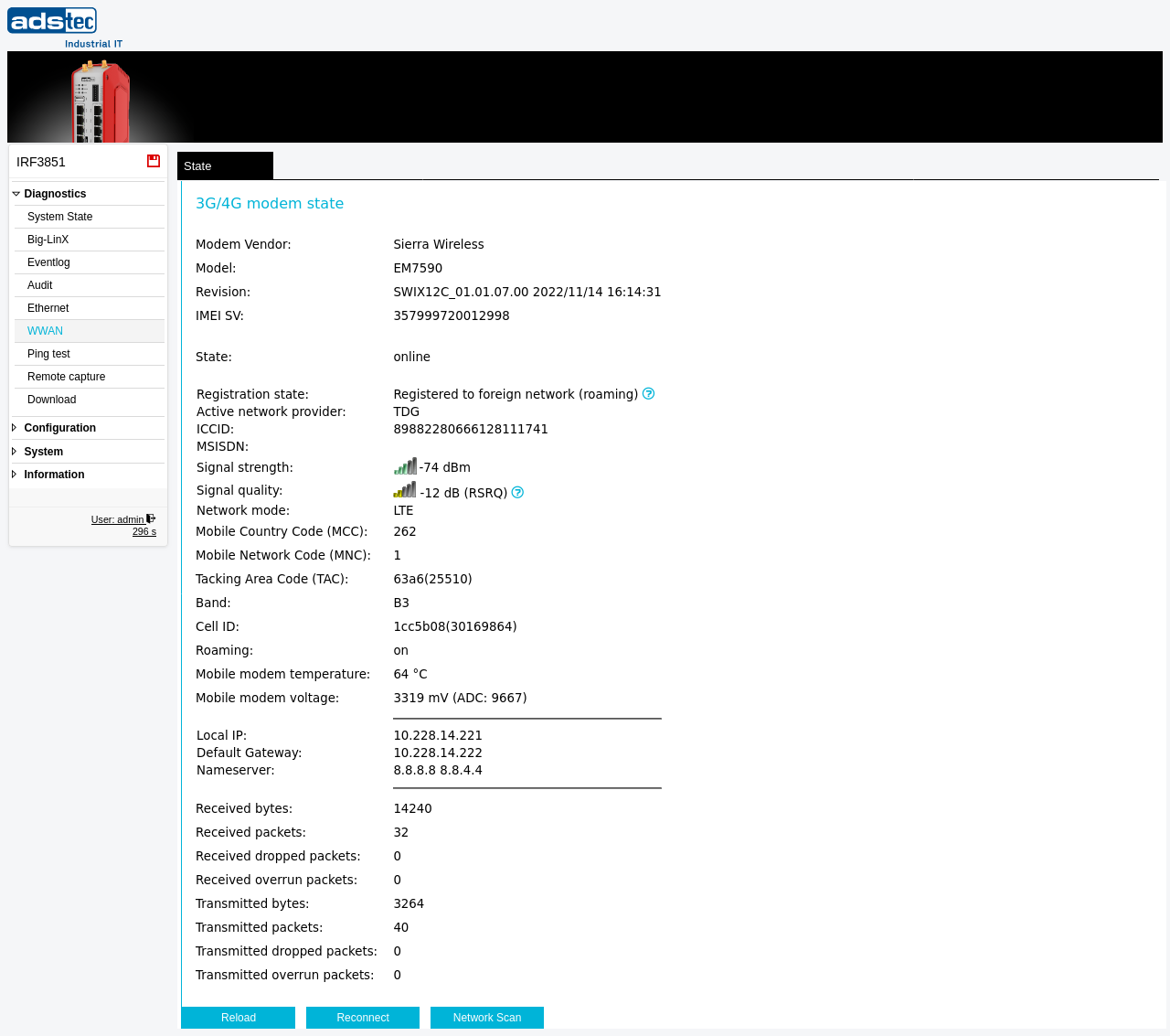
3G/4G modem state
The upper section displays hardware identification and firmware details of the built-in cellular modem:
- Modem Vendor
- The manufacturer of the cellular modem module (e.g., Sierra Wireless, Incorporated).
- Model
- The modem model designation (e.g., EM7455).
- Revision
- The modem firmware revision string, including build identifiers and date.
- IMEI SV
- The IMEI Software Version number of the modem.
- Firmware version
- The firmware version currently running on the cellular modem.
- Config version
- The modem configuration version identifier.
- Carrier name
- The carrier profile loaded on the modem (e.g., GENERIC). This determines the modem's compatibility settings for the mobile network.
Connection state
- State
- The current connection state of the cellular modem — online indicates that the modem has successfully connected to the mobile network and obtained an IP address. Other values such as offline or connecting indicate that the connection is not yet established.
Network registration
- Registration state
- The modem's registration status with the mobile network. Typical values include Registered to home network or Registered to foreign network (roaming). If the modem cannot register, check the SIM card, PIN configuration, and APN settings on the IP configuration page.
- Active network provider
- The name of the mobile network operator to which the modem is currently connected (e.g., Telekom.de 1nce.net).
- ICCID
- The Integrated Circuit Card Identifier — the unique serial number of the inserted SIM card.
- MSISDN
- The Mobile Subscriber Integrated Services Digital Network Number — the phone number associated with the SIM card, if provided by the operator.
Signal and radio parameters
- Signal strength
- The received signal power in dBm, displayed with a visual bar indicator. Typical values range from approximately -50 dBm (excellent) to -110 dBm (very weak). Values below -100 dBm may result in unreliable connectivity and increased latency.
- Signal quality
- A secondary signal quality metric reported by the modem, such as RSRQ (Reference Signal Received Quality) in dB. This value indicates the quality of the received signal relative to interference and noise. Higher (less negative) values indicate better signal quality.
- Network mode
- The radio access technology currently in use — for example LTE, UMTS, or GSM. LTE provides the highest throughput and lowest latency. The modem automatically selects the best available technology based on network conditions.
- Mobile Country Code (MCC)
- The three-digit code identifying the country of the active mobile network (e.g., 262 for Germany).
- Mobile Network Code (MNC)
- The code identifying the specific mobile network operator within the country (e.g., 1 for Telekom).
- Tracking Area Code (TAC)
- The tracking area code of the LTE cell to which the modem is currently attached. This value is useful for identifying the geographical area of the serving cell.
- Band
- The frequency band currently in use for the cellular connection (e.g., B3, B7, B20). The available bands depend on the modem hardware and the mobile network operator.
- Cell ID
- The unique identifier of the serving cell tower. This value can be used to identify the specific base station to which the modem is connected, which is helpful for troubleshooting coverage issues.
- Roaming
- Indicates whether the modem is currently roaming on a foreign network — on or off. Roaming may incur additional charges depending on the mobile data plan.
Modem hardware status
- Mobile modem temperature
- The current operating temperature of the cellular modem in degrees Celsius. Monitor this value in environments with high ambient temperatures to ensure the modem operates within its rated temperature range.
- Mobile modem voltage
- The current supply voltage of the cellular modem in millivolts (mV). This value should remain stable during normal operation. Significant deviations may indicate power supply issues.
Local IP
- Local IP
- The IP address and subnet mask assigned to the WWAN interface by the mobile network operator. This is the address used by the device for cellular communication. The assigned address may be a private address if the operator uses carrier-grade NAT.
Traffic statistics
The lower section displays cumulative packet and byte counters for the WWAN interface since the last system boot or modem reconnect:
- Received bytes
- The total number of bytes received on the cellular interface.
- Received packets
- The total number of packets received on the cellular interface.
- Received dropped packets
- The number of received packets that were dropped by the system. A non-zero value may indicate buffer overflows or resource constraints.
- Received overrun packets
- The number of received packets lost because the interface buffer was full.
- Transmitted bytes
- The total number of bytes transmitted from the cellular interface.
- Transmitted packets
- The total number of packets transmitted from the cellular interface.
- Transmitted dropped packets
- The number of outgoing packets that were dropped before transmission.
- Transmitted overrun packets
- The number of outgoing packets lost due to a transmit buffer overrun.
Note
All traffic counters are reset to zero when the device is rebooted or when the cellular connection is re-established. The counters represent cumulative values since the last connection start.
Actions
Click Reload to refresh the displayed values with the current status from the device.
Click Reconnect to disconnect and re-establish the cellular connection. Use this action when the modem is in an error state or when network parameters have changed and a fresh connection is required.
Click Network Scan to initiate a scan for available mobile networks. This can be useful to verify which network operators are available at the current location, particularly when troubleshooting registration or roaming issues.