DNS
Navigation: Configuration > Network > DNS
The DNS page configures the hostname of the device and the upstream DNS servers used for name resolution. The hostname identifies the device in event log messages, DHCP registrations, and network diagnostics. The DNS server addresses specified here are used by the device itself to resolve hostnames wherever they appear in the configuration, such as NTP server addresses, update server URLs, or VPN endpoint names. If the built-in DNS proxy is enabled, it forwards queries from LAN clients to these configured upstream servers. The domain name search suffix is distributed to DHCP clients when the DHCP server is active and controls which DNS queries remain local. Changes take effect after clicking Apply settings, but must be saved persistently via the Save page to survive a reboot.
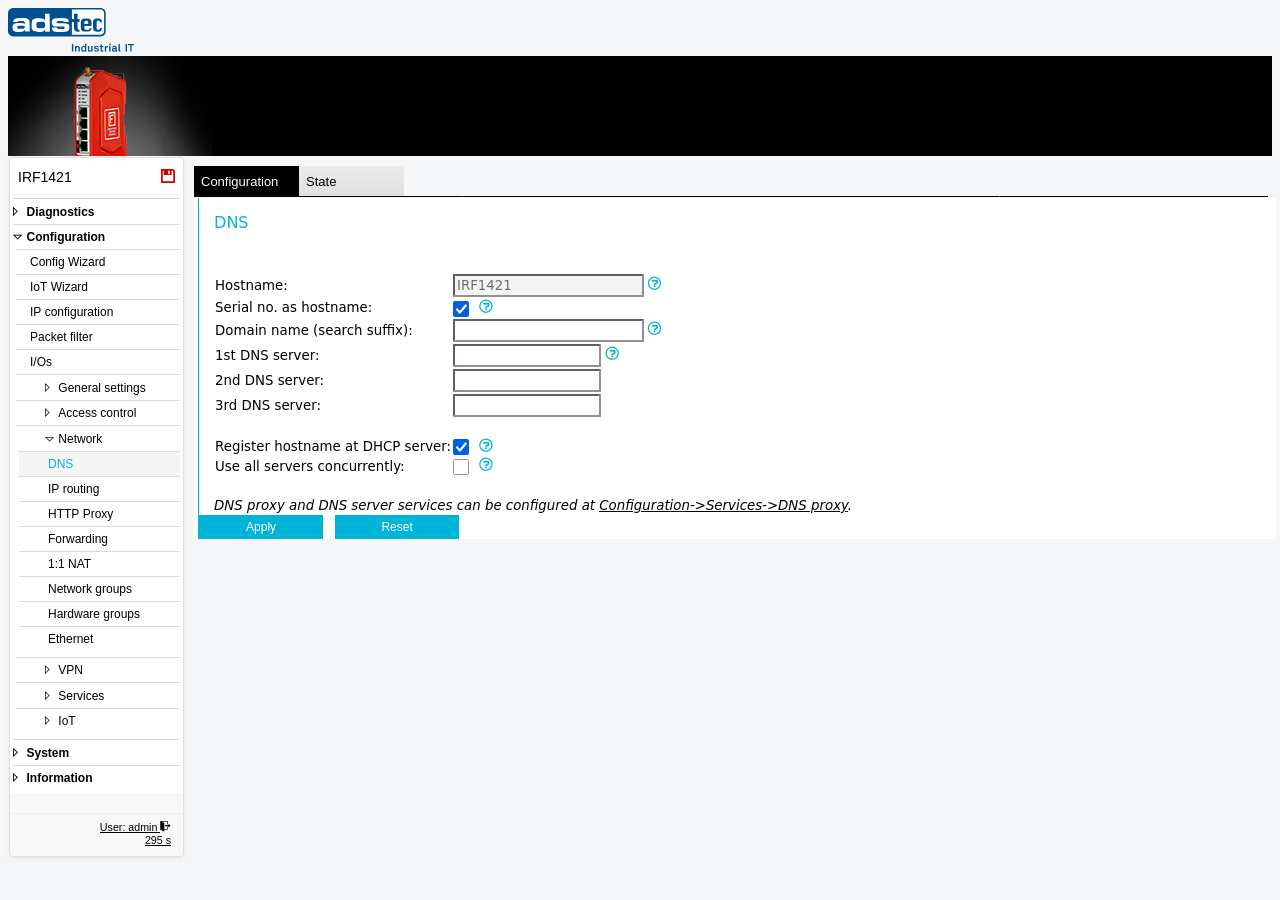
Settings
Hostname
- Hostname
- The DNS hostname of the device. This name is used in Eventlog messages and in DHCP registrations. Enter a hostname that clearly identifies the device within the network, for example the device type or its location designation.
- Serial no. as hostname
- When enabled, the device automatically uses its type designation and serial number as the hostname. This ensures a unique hostname without manual configuration and is useful in deployments with multiple devices of the same type.
Name resolution
- Domain name (search suffix)
- The DNS domain search suffix. This suffix is distributed to DHCP clients when the DHCP server is enabled. DNS queries for names ending with this suffix are resolved locally and are not forwarded to any upstream DNS server. Leave this field empty if no local domain is used.
- 1st DNS server
- The IP address of the primary DNS server. At least one DNS server must be configured for the device to resolve hostnames to IP addresses. The device uses this server for all internal name resolution, including NTP server lookups, software update server connections, and VPN endpoint resolution.
- 2nd DNS server
- The IP address of a secondary DNS server. This server is used as a fallback if the primary DNS server does not respond. Configuring a secondary server improves reliability of name resolution.
- 3rd DNS server
- The IP address of a tertiary DNS server. This server provides an additional fallback level. In most installations, two DNS servers are sufficient.
Options
- Register hostname at DHCP server
- When enabled, the device includes its hostname in every DHCP request it sends. If the upstream DHCP server supports dynamic DNS updates according to RFC 2136, this results in a valid DNS record for the device on the DNS server. This allows other devices to reach the firewall by hostname rather than by IP address.
- Use all servers concurrently
- When enabled, DNS queries are forwarded to all configured DNS servers simultaneously. The fastest response is used and returned to the requester. When disabled, only a single DNS server is queried at a time. Enabling this option can reduce name resolution latency but generates additional network traffic.
Security
Restrict DNS server addresses to trusted resolvers within your organization or to well-known public DNS services. Using untrusted DNS servers exposes the device and all clients relying on its DNS proxy to DNS spoofing and redirection attacks. In security-sensitive environments per IEC 62443, document the configured DNS servers as part of the network security architecture and verify them during periodic security audits.