Certificates
Navigation: Configuration > General settings > Certificates
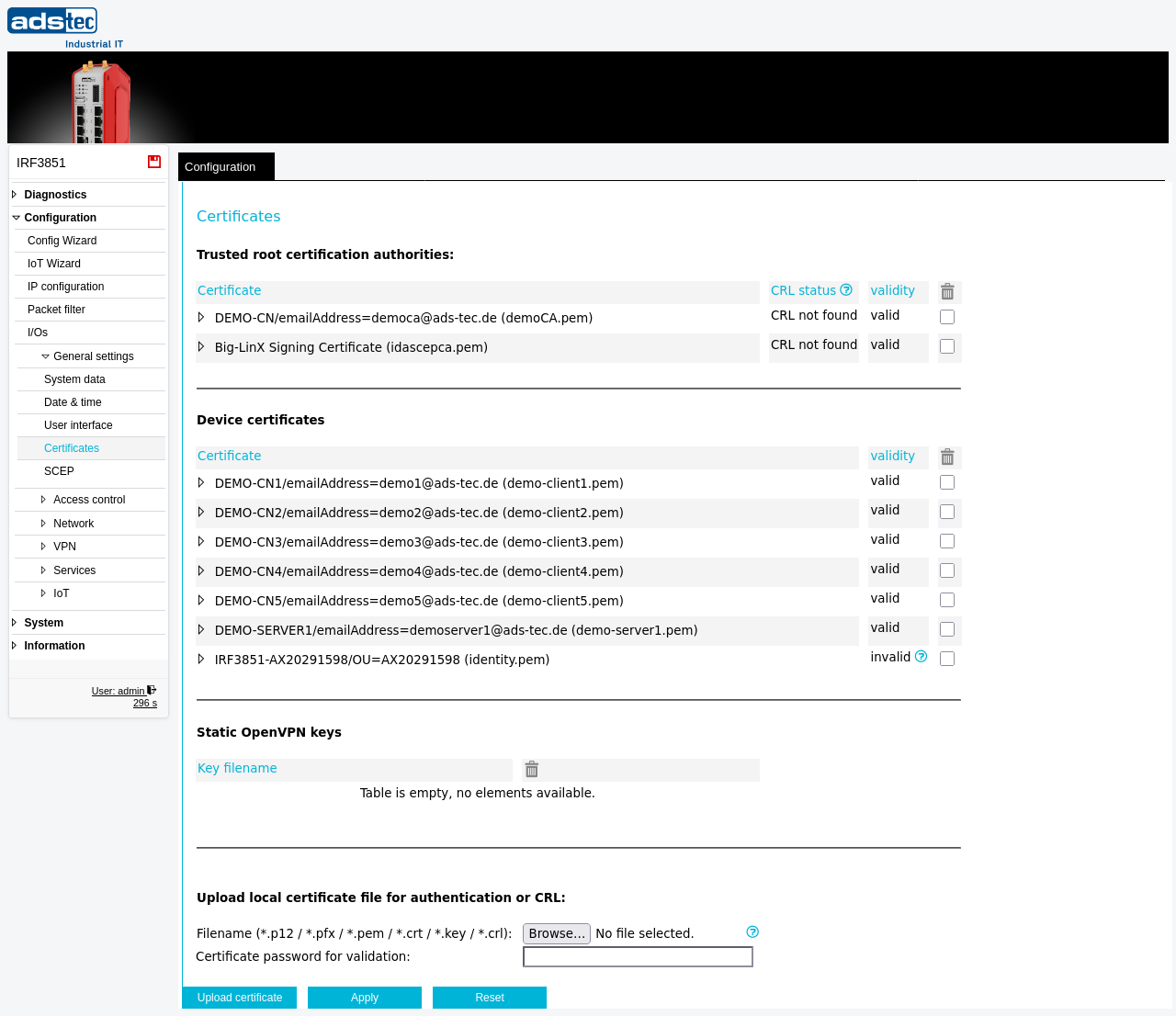
The Certificates page manages all X.509 certificates and keys used by the device for encrypted communication. Certificates uploaded here are available to VPN services such as OpenVPN and IPsec, to the integrated Web server for HTTPS access, and to the device identity itself. The page displays three separate tables: trusted root certification authorities (CA certificates), device certificates (client and server certificates), and static OpenVPN keys. Certificate Revocation Lists (CRLs) can also be uploaded to enable revocation checking against the installed CA certificates. For automated certificate enrollment, see the SCEP page.
Settings
Trusted root certification authorities
This table lists all CA certificates installed on the device. Each entry shows the certificate name with its filename in parentheses, the CRL status, and the validity state.
- Certificate
- The distinguished name and filename of the installed CA certificate. Expanding an entry displays additional certificate details. A CRL file (Certificate Revocation List) can be uploaded with the form at the bottom of the page to enable revocation checking for certificates issued by this CA.
- CRL status
- Indicates whether a matching Certificate Revocation List has been loaded for this CA certificate. A status of "CRL not found" means no CRL has been uploaded yet. Once a CRL is uploaded, this field shows the CRL status.
- validity
- Indicates whether the CA certificate is currently valid. The checkbox reflects the validation state of the certificate.
Device certificates
This table lists all client and server certificates installed on the device. These certificates are used for device authentication in VPN tunnels, HTTPS connections, and other TLS-secured services.
- Certificate
- The distinguished name and filename of the installed device certificate. Expanding an entry displays the full certificate details including issuer, validity period, and any validation errors. If the issuing CA certificate is not installed in the trusted root certification authorities table, the certificate is shown as "invalid" with a corresponding error message.
- validity
- Indicates whether the device certificate is currently valid. A certificate may be marked invalid if its issuing CA is missing, if it has expired, or if it has been revoked by a CRL.
Static OpenVPN keys
This table lists static key files uploaded for use with OpenVPN in static key mode. Each entry shows the key filename. The table is empty when no static OpenVPN keys have been uploaded.
Upload local certificate file for authentication or CRL
- Filename (.p12 / .pfx / .pem / .crt / *.key)
- Selects the certificate file to upload to the device. Certificates can be uploaded in PKCS#12 format (.p12 / .pfx) or PEM format (.pem / .crt). In case of a PKCS#12 file, the contained certificates are extracted automatically. Alternatively, a CRL (Certificate Revocation List) can be uploaded — the corresponding CA certificate must already be installed on the device. Additionally, OpenVPN key files can be uploaded (.key).
- Certificate password for validation
- The password protecting the certificate file. Required for password-protected PKCS#12 files. Leave empty if the file is not password-protected or is in PEM format.
ATTENTION
If a certificate with the same filename already exists on the device, it must be deleted before uploading a replacement. Uploading a certificate does not automatically overwrite an existing file with the same name. To delete a certificate, click the delete icon next to the corresponding entry in the certificate table.
Security
Upload only certificates from trusted sources. Restrict the set of trusted root CA certificates to the minimum required for your deployment to limit the trust chain. Regularly check CRL status and upload current CRLs for all installed CA certificates to ensure revoked certificates are detected promptly. Use strong passwords for PKCS#12 files during transfer. Remove any unused or expired certificates to reduce the attack surface.