Web access
Navigation: Configuration > Access control > Web access
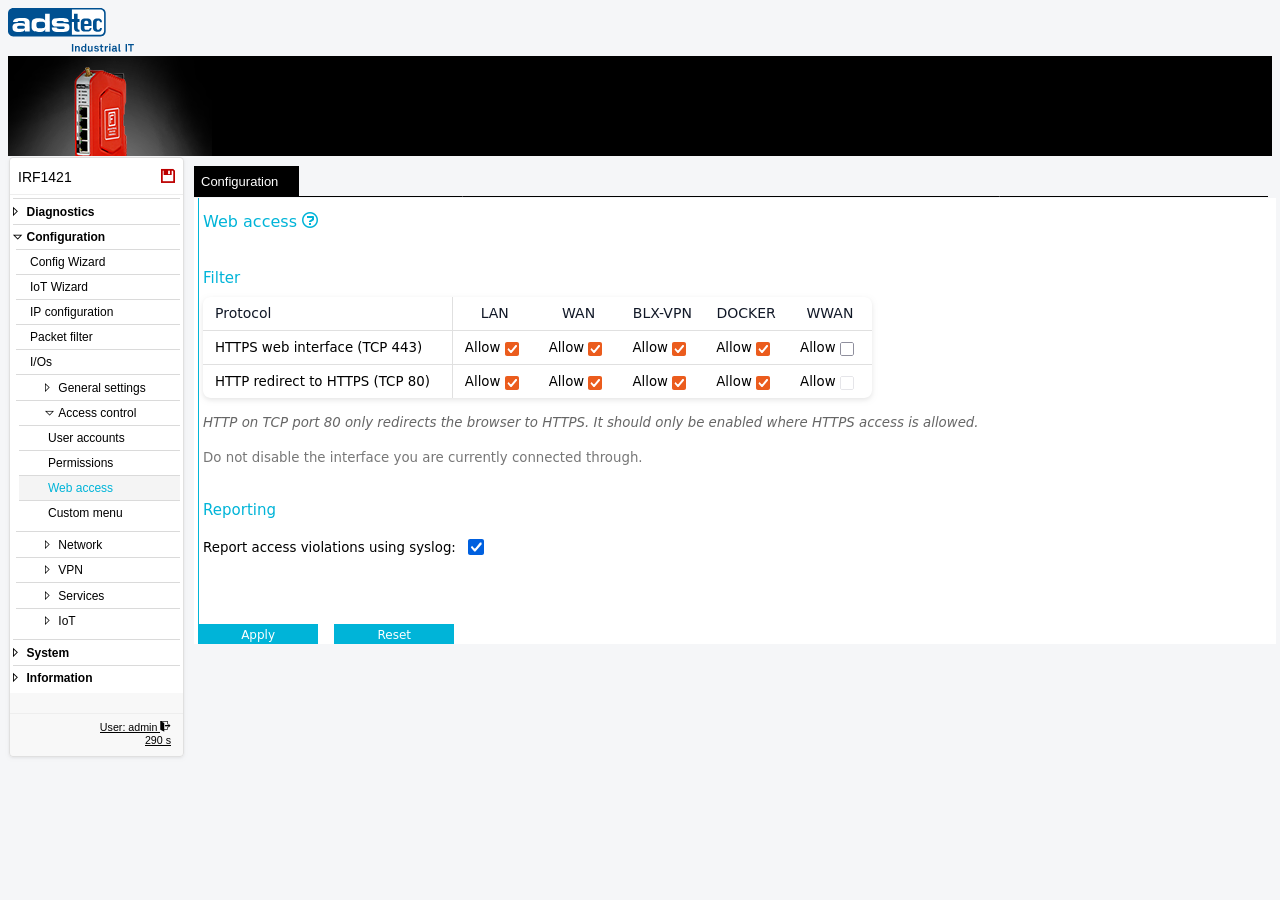
The Web access page controls which network interfaces allow access to the device's web interface. For each interface — LAN, WAN, BLX-VPN (Big-LinX VPN), Docker, and WWAN — administrators can independently enable or disable HTTPS access (TCP port 443) and the HTTP-to-HTTPS redirect (TCP port 80). Access via HTTPS is mandatory; HTTP access only delivers a redirect to HTTPS. This page works in conjunction with the User accounts page, which defines who may log in, and the Permissions page, which determines what each user is allowed to do. The HTTPS certificate used by the web interface can be managed on the Certificates page, and the underlying web server port settings are configured on the Web server page. Changes take effect immediately after clicking Apply settings, but must be saved persistently via the Save page to survive a reboot.
Settings
Filter
The filter table defines on which interfaces the web interface is reachable. Each row represents a protocol, and each column represents a network interface. Enable or disable access by checking or unchecking the Allow checkbox at the intersection of protocol and interface.
- HTTPS web interface (TCP 443)
-
Enables access to the web interface via HTTPS on the selected interface. HTTPS provides encrypted communication between the browser and the device. This is the primary access method and must be enabled on at least one interface to allow management of the device.
Available interfaces:
LAN: Allows web interface access from the local network. This is the default and most common access path for on-site administration.
WAN: Allows web interface access from the wide area network. Enable this only if remote management via the WAN interface is required.
BLX-VPN: Allows web interface access through an active Big-LinX VPN tunnel. This enables remote administration via the Big-LinX cloud platform without exposing the web interface directly on the WAN.
DOCKER: Allows web interface access from Docker containers running on the device.
WWAN: Allows web interface access via the cellular (WWAN) interface. Enable this only if management over the mobile network is required.
- HTTP redirect to HTTPS (TCP 80)
- Enables an automatic redirect from HTTP (port 80) to HTTPS (port 443) on the selected interface. HTTP on TCP port 80 only redirects the browser to HTTPS. It should only be enabled where HTTPS access is also allowed. This convenience feature ensures that users who type an HTTP URL are automatically redirected to the secure HTTPS connection.
Reporting
- Report access violations using syslog
- When enabled, access attempts to interfaces where web access is not allowed are logged via syslog. This provides an audit trail of unauthorized access attempts and can be forwarded to a central log server for monitoring. Access violations are also visible in the Eventlog.
ATTENTION
Do not disable web interface access on the interface you are currently connected through. If you accidentally lock yourself out of the web interface on all interfaces, a power cycle restores the last saved configuration. Always save the current working configuration via the Save page before making changes to web access settings.
Security
Restrict web interface access to the minimum number of interfaces required for administration. In accordance with IEC 62443, disable HTTPS access on the WAN and WWAN interfaces unless remote management is explicitly needed — every enabled interface increases the attack surface. If remote management is required, prefer access via BLX-VPN over direct WAN or WWAN exposure, as the VPN tunnel provides an additional layer of authentication and encryption. Enable syslog reporting for access violations to detect unauthorized access attempts. Ensure that the HTTPS certificate is valid and up to date via the Certificates page to prevent man-in-the-middle attacks.