Configuration
Navigation: Diagnostics > Eventlog > Configuration
The Configuration tab of the Eventlog page configures the syslog subsystem of the device. It controls whether event log messages are forwarded to a remote syslog server and which message categories are included in both the remote syslog stream and the local event log. Use this page to integrate the device into a centralized log management infrastructure or to include audit log entries in the local event log for consolidated monitoring.
Changes take effect immediately after clicking Apply settings, but must be saved persistently via the Save page to survive a reboot.
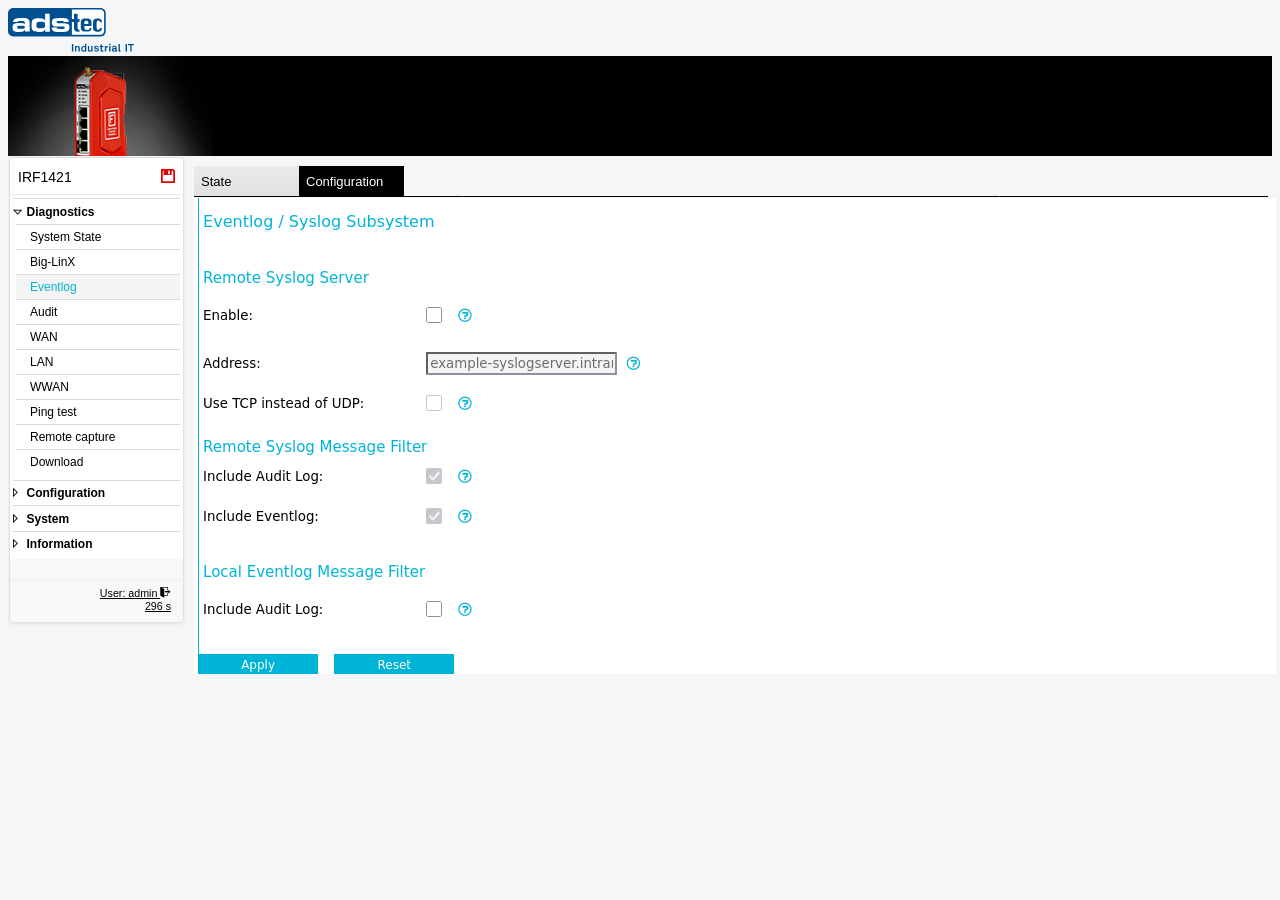
Settings
Remote Syslog Server
- Enable
- Activates forwarding of log messages to a remote syslog server. When enabled, the device sends syslog messages to the server specified in the Address field. When disabled, all log messages are stored locally only.
- Address
- Hostname or IP address of the remote syslog server that receives the forwarded log messages (e.g.,
example-syslogserver.intranet). - Use TCP instead of UDP
- When enabled, the device sends syslog messages over TCP instead of the default UDP protocol. TCP provides reliable, connection-oriented delivery, ensuring that no log messages are lost due to network congestion or packet loss. Use TCP when reliable delivery of log messages is required, for example in security-sensitive environments or when log completeness is mandated by compliance requirements.
Remote Syslog Message Filter
These settings control which message categories are included in the log stream forwarded to the remote syslog server. They have no effect when the remote syslog server is disabled.
- Include audit log
- When enabled, audit log entries are included in the syslog messages forwarded to the remote server. Audit log entries contain security-relevant events such as authentication activities, configuration changes, and system-level actions. See the Audit page for details on audit log categories.
- Include eventlog
- When enabled, general event log entries (system events, service notifications, network state changes) are included in the syslog messages forwarded to the remote server.
Local Eventlog Message Filter
This setting controls which additional message categories are included in the local event log displayed on the Eventlog Status tab.
- Include audit log
- When enabled, audit log entries are merged into the local event log. This allows operators to view both system events and security-relevant audit entries in a single chronological view on the Eventlog page. When disabled, audit log entries are only available on the Audit page.
Note
The remote syslog server must be reachable from the device. Ensure that the network path to the syslog server is not blocked by Packet filter rules and that the appropriate routing is configured on the IP routing page. The default syslog port is UDP/514 or TCP/514, depending on the transport protocol selected.
Security
Forwarding log messages to a centralized syslog server is recommended for security-sensitive environments. A remote copy of the log data ensures that event records are preserved even if the device is compromised, reset to factory defaults, or experiences a hardware failure. Use TCP transport to guarantee reliable delivery and prevent log message loss. Restrict access to the syslog server to authorized personnel and protect the network path between the device and the syslog server against eavesdropping, as log messages may contain sensitive information such as IP addresses, user names, and configuration details.