SMS Service
Navigation: Configuration > Services > SMS Service
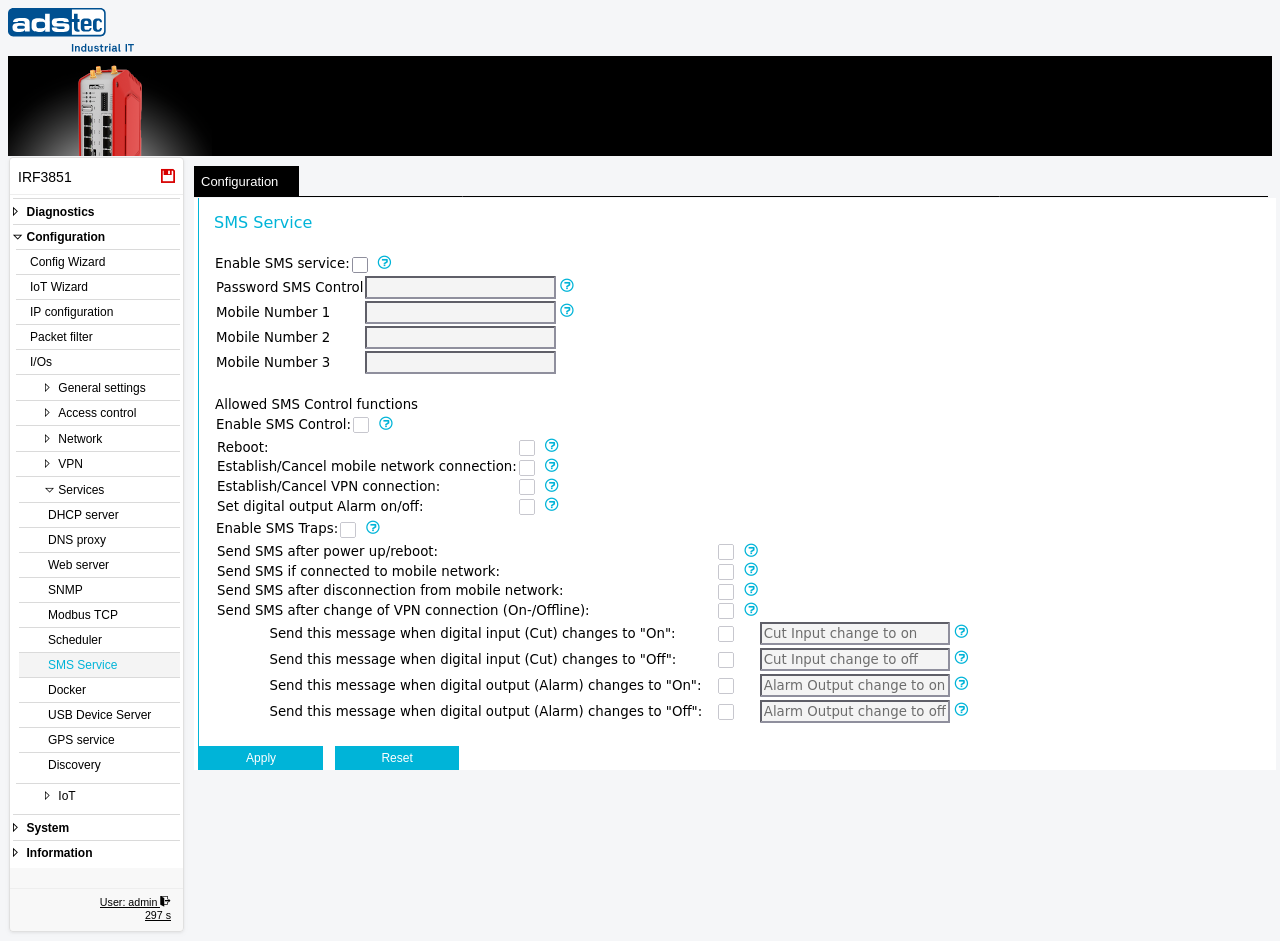
The SMS Service page configures the device to send and receive text messages (SMS) via the built-in cellular modem. SMS can be used in two directions: as an input channel, where authorized mobile phones send control commands to the device (e.g., triggering a reboot or toggling a VPN connection), and as an output channel, where the device sends notification messages (SMS traps) to registered mobile numbers when specific events occur, such as power-up, mobile network connection changes, VPN state changes, or digital I/O transitions. Up to three authorized mobile numbers can be configured. A password can be assigned to protect incoming control messages against unauthorized use. SMS-triggered actions and event notifications can also be combined with the Scheduler to implement comprehensive remote management workflows. Changes take effect after clicking Apply, but must be saved persistently via the Save page to survive a reboot.
Note
The WWAN (cellular) settings described in this section are only available on IRF3000 models equipped with an optional WWAN modem. These settings do not appear on devices without cellular hardware.
Prerequisites
- The device must be equipped with a WWAN modem and have an active SIM card inserted with SMS capability.
- The mobile network connection must be operational. Verify connectivity on the WWAN diagnostics page.
- At least one authorized mobile number must be configured before SMS control or SMS traps can be used.
Settings
SMS Service
- Enable SMS service
- Enables or disables the SMS service globally. When enabled, the device can use text messages for control functions (SMS input) and send information messages (SMS output). When disabled, all SMS functionality is inactive.
- Password SMS Control
- Sets a password that must be included in every incoming SMS control message. If a password is configured, each control SMS must use the format
#<password>?<command>(e.g.,#password?rebootor#password?OutputAlarm=on). Messages without the correct password are discarded. Leave empty to allow control messages without password protection. - Mobile Number 1
- The first authorized mobile phone number. Only defined mobile numbers may send SMS control messages to the device and receive SMS traps from it. At least one mobile number must be configured to use SMS services. Use international format (e.g.,
+49 123456789). - Mobile Number 2
- Optional second authorized mobile phone number. Same format as Mobile Number 1.
- Mobile Number 3
- Optional third authorized mobile phone number. Same format as Mobile Number 1.
Allowed SMS Control functions
- Enable SMS Control
- Allows or denies the use of incoming text messages for control functions (SMS input). When disabled, the device ignores all incoming SMS commands even if the SMS service is enabled.
- Reboot
- Allows or denies a device reboot via SMS command. Format:
#password?rebootor?rebootif no password is set. For feedback about a successful reboot, activate the SMS trap "Send SMS after power up / reboot". - Establish/Cancel mobile network connection
- Allows or denies establishing or canceling the Internet connection of the mobile interface via SMS command. Format:
#password?MobileConnection=on/offor?MobileConnection=on/offif no password is set. For feedback, activate the related SMS traps for mobile network connection and disconnection. - Establish/Cancel VPN connection
- Allows or denies establishing or canceling a predefined VPN connection via SMS command. Supported connections: OpenVPN1 through OpenVPN10, IPsecVPN, or u-linkVPN. Examples:
#password?OpenVPN1=on/off,?IPsecVPN=on/off,#password?u-linkVPN=on/off. For feedback, activate the SMS trap "Send SMS after change of VPN connection (On-/Offline)". - Set digital output Alarm on/off
- Allows or denies setting the digital output (Alarm) on or off via SMS command. Format:
#password?OutputAlarm=on/offor?OutputAlarm=on/offif no password is set. For feedback, activate the SMS traps related to the digital output (Alarm).
Enable SMS Traps
- Enable SMS Traps
- Enables or disables the sending of SMS trap notifications. SMS traps are sent only to the defined mobile numbers 1--3.
- Send SMS after power up/reboot
- If enabled, the message
<system name>: Reboot/Power Up at <system time>is sent to the defined mobile numbers 1--3 after a reboot or power-up event. - Send SMS if connected to mobile network
- If enabled, the message
<system name>: Connected to <provider> via <network mode>, IP address=<IP>is sent to the defined mobile numbers 1--3 after the mobile internet connection is established. - Send SMS after disconnection from mobile network
- If enabled, the message
<system name>: Disconnected from mobile network at <system time>is sent to the defined mobile numbers 1--3 after the device disconnects from the mobile internet. - Send SMS after change of VPN connection (On-/Offline)
- If enabled, the message
<system name>: OpenVPN1...10 / IPsecVPN / u-linkVPN established/disconnectedis sent to the defined mobile numbers 1--3 after a change in one of the defined VPN connections. - Send this message when digital input (Cut) changes to "On"
- If enabled, a user-defined message is sent to the defined mobile numbers 1--3 when the digital input (Cut) changes to on. Enter the desired notification text in the text field.
- Send this message when digital input (Cut) changes to "Off"
- If enabled, a user-defined message is sent to the defined mobile numbers 1--3 when the digital input (Cut) changes to off. Enter the desired notification text in the text field.
- Send this message when digital output (Alarm) changes to "On"
- If enabled, a user-defined message is sent to the defined mobile numbers 1--3 when the digital output (Alarm) changes to on. Enter the desired notification text in the text field.
- Send this message when digital output (Alarm) changes to "Off"
- If enabled, a user-defined message is sent to the defined mobile numbers 1--3 when the digital output (Alarm) changes to off. Enter the desired notification text in the text field.
ATTENTION
SMS control commands allow remote actions such as device reboots, VPN connection changes, and digital output switching without access to the web interface. If no password is configured, anyone who knows the device's mobile number can send control commands. Always configure a strong SMS control password and restrict the authorized mobile numbers to trusted personnel only.
Security
Enable the SMS service only if remote SMS-based control or notification is explicitly required. Always set an SMS control password to authenticate incoming commands. Limit the authorized mobile numbers to the minimum necessary. Disable individual SMS control functions (reboot, VPN, mobile connection, digital output) that are not needed to reduce the attack surface. Review the configured mobile numbers and enabled control functions regularly as part of your security audit. Be aware that SMS messages are transmitted unencrypted over the cellular network and can potentially be intercepted or spoofed — do not rely on SMS as the sole security mechanism for critical operations.